
































Engraving a Zippo lighter is a reliable way to personalise and enhance its appearance. Whether for personal use, branding, or gifting, engraving adds long-term value and distinction.
Both mechanical and manual engraving techniques are available, each suited to different skill levels and equipment. This guide explains four practical engraving methods, outlines common errors to avoid, provides maintenance recommendations, and answers key questions — helping you achieve clean and durable results.

In this article:
- Part 1: Four Methods to Engrave a Zippo Lighter
- Method 1: Laser Engraver
- Method 2: Hammer & Chisel
- Method 3: Rotary Tool
- Method 4: CNC machine
- Part 2: Common Mistakes to Avoid When Engraving a Zippo Lighter
- Part 3: How to Maintain Your Engraved Zippo Lighter
- Part 4: FAQs about Engraving a Zippo Lighter
Part 1: Four Methods to Engrave a Zippo Lighter
Want to make your Zippo stand out? Below are four popular engraving methods, along with guidance on the tools and skill level required. The right choice depends on the finish you're aiming for — whether that's handcrafted character or machine-level precision.
Method 1: Engrave a Zippo Lighter With a Laser Engraver
If you're looking for highly precise and durable results — such as detailed logos, fine text, or intricate artwork — using a fibre laser engraver is the most reliable option.
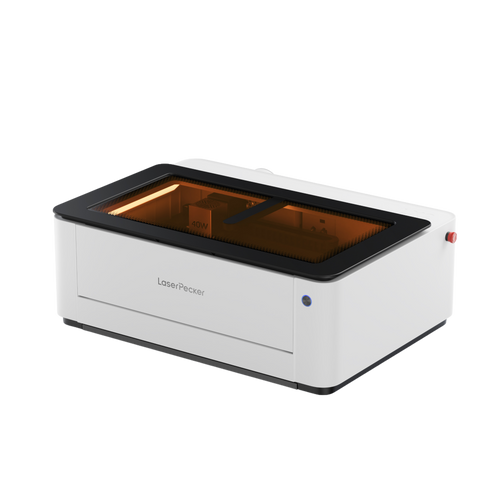
Take LaserPecker LP5, for example. It uses a 20W blue diode laser (450nm) and a 20W fibre laser (1064nm). It can work with metal, wood, leather, or even glass. That makes it good for just about any kind of Zippo.
What's so great:
-
Exact for Small Stuff:
Ideal for small lettering, thin lines, and complex graphics that would be difficult to achieve by hand. -
Lasts a Long Time:
The engraving permanently alters the surface, so it won't fade or wear away easily. -
Works with Many Things:
The dual-laser system allows switching between coated and uncoated metals, as well as other materials. -
Speed & Consistency
Fast processing and repeatable accuracy make it suitable for gifts, personal projects, or small business orders.
Basic steps:
- Clean the lighter and secure it in the work area.
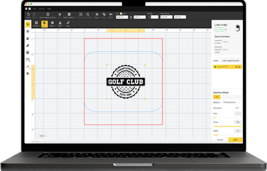
- Import or create your design using the compatible software.
- For Zippo lighters, which are metal, an fiber laser is the best choice for engraving. It makes clean, exact marks without hurting the metal.
- Preview the engraving path.
- Begin engraving, monitoring for proper depth and contrast.
- Clean up and check the final design.

Method 2: Engrave a Zippo Lighter by Hand (Hammer & Chisel)
Hand engraving is a traditional technique that involves carving directly into the metal using manual tools.
What's so great:
- Totally handmade; each hit is unique.
- Classic and artistic; no two are exactly alike.
- Ideal for collectors who appreciate skill over speed.
Basic steps:
- Get your gear: engraving chisel, small hammer, and a plain Zippo.
- Lightly sketch your design on the Zippo (with pencil).
- Carefully carve along the lines with the hammer and chisel, going slowly.
- Lightly polish the lighter to show off the engraving.
Method 3: Engrave a Zippo Lighter with a Rotary Tool
A rotary tool offers more control than hammer engraving while remaining affordable and accessible.
What's so great:
- More exact than hand engraving.
- Cheaper than laser engravers
- Good for beginners adding names, designs, or small pictures.
Basic steps:
- Clean the lighter. If it's a matte, use a cleaner to ready it.
- Cover spots to avoid scratches.
- Put a fine engraving bit on the rotary tool and trace your design evenly.
- Take off the tape and polish to make it clear.
Method 4: Engrave a Zippo Lighter with a CNC Machine
CNC engraving is about as accurate as you can get, and keeps things consistent.
What's so great:
- The results are crazy accurate, and every lighter comes out the same.
- Perfect for business projects when you need exact copies or more complex drawings
- Reduces errors and keeps each one looking identical.
Basic steps:
- Secure the lighter flat on the CNC bed and set the zero point.
- Import the artwork and adjust speed, power, and line density.
- Run a test engraving.
- Execute final engraving, then clean and inspect.
Comparison of Zippo Lighter Engraving Methods
| Method | Tools Required | Skill Level | Speed | Precision & Detail | Cost | Best For |
|---|---|---|---|---|---|---|
| Hand Engraving (Hammer & Chisel) | Hammer, chisel, polishing tools | Expert | Very slow | Artistic but variable | Low | Collectors valuing traditional craftsmanship |
| Rotary Tool Engraving | Rotary tool with engraving bits | Beginner–Intermediate | Medium | Good, limited for ultra-fine detail | Affordable | Hobbyists, simple personalisation |
| Laser Engraving | Dual-laser engraver (fibre + diode), compatible software | Easy to learn | Very fast | Ultra-precise, consistent | Higher upfront investment | Professionals, small businesses, premium results |
| CNC Engraving | CNC engraving machine, CAD/CAM software | Advanced | Fast | Industrial-level precision | High | Batch production, complex designs |
Part 2: Common Mistakes to Avoid When Engraving A Zippo Lighter
Even with quality tools and careful planning, mistakes can happen — particularly for beginners. Being aware of common issues will help you avoid damaging the lighter and achieve cleaner, more professional results.
1. Prepare the Surface Properly
Oil, fingerprints, and residue can interfere with engraving quality. Always clean the lighter with isopropyl alcohol before starting. If the surface is matte or painted, test a small hidden area first before sanding lightly to improve contrast.
2. Use the Right Tool for the Finish
Not all engraving tools perform well on chrome-plated or polished surfaces. Some laser systems struggle with reflective coatings, and rotary tools can slip on smooth metal. Always ensure your chosen tool is suitable for the lighter's surface material.
3. Incorrect Depth and Speed Settings
Excessive depth may damage the casing, while insufficient power can result in faint markings that fade over time. Test your settings on scrap metal before engraving the actual lighter and adjust gradually to achieve clean contrast without compromising structural integrity.
4. Failing to Secure the Lighter
Movement during engraving can ruin alignment and detail. Use clamps, fixtures, or strong tape to hold the lighter firmly in place before beginning.
5. Skipping Design Planning
Always preview your layout before engraving. Templates or engraving software can help ensure correct positioning and spacing. Checking alignment in advance significantly reduces costly errors.
6. Overheating the Metal
Excessive laser power or prolonged rotary contact can cause discolouration or slight warping. Work at controlled speeds and allow the material to cool if necessary.
7. Not Practising First
If you're new to engraving, practise on scrap metal or inexpensive lighters before working on a final piece. Experience improves control, depth accuracy, and overall finish quality.

Part 3: How To Maintain Your Engraved Zippo Lighter
Once your design has been engraved, proper care will help preserve both the lighter and the detailing. Regular maintenance keeps the engraving clear and prevents unnecessary wear over time.
Simple Cleaning Steps
A gentle wipe with a soft, lint-free cloth after regular use helps remove fingerprints, soot, and surface residue.
If deeper cleaning is needed, use mild soap with warm water. Avoid soaking the lighter. After cleaning, dry it thoroughly to prevent water marks or corrosion.
Protecting Your Engravings
Avoid abrasive cleaners or harsh chemicals, as these can dull the engraved surface.
When polishing, use a suitable metal polish and apply it carefully around the engraved area rather than directly over it. This helps maintain contrast and sharpness for years to come.
Regular light maintenance ensures your engraved Zippo remains visually crisp and mechanically reliable.
Part 4: FAQs about Engraving a Zippo Lighter
Q1. What's the best way to start engraving?
If you're new to engraving and want clean, professional-looking results, laser engraving is generally the easiest starting point. It offers high precision and consistent outcomes on metal, wood, and leather. Modern systems are user-friendly and allow fine detailing with minimal trial and error.
Q2. Can I engrave my Zippo if it's not just the plain metal kind?
Yes. Brass models are relatively easy to engrave by hand. Chrome-plated finishes usually require laser or CNC engraving for clear contrast. Matte or painted finishes can engrave well, but always test a small hidden area first to check the result.
Q3. Do I need fancy computer stuff?
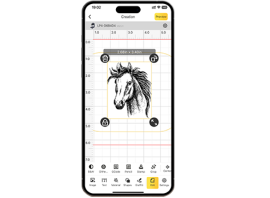
CNC engraving requires design software to control speed, depth, and positioning. Laser systems typically use dedicated software or mobile apps. Hand engraving and rotary tools do not require software, although stencils can improve accuracy.
Q4. What kind of engraving lasts the longest?
Laser and CNC engraving tend to last the longest, especially when engraved with sufficient depth. Hand and rotary engraving durability depends on technique and depth. Deeper machine engraving generally offers maximum longevity.
Q5. Could engraving ruin my Zippo?
If done correctly, engraving will not affect functionality. Avoid engraving near hinges or moving parts. The main risk comes from excessive depth or poor alignment, which can impact appearance.
Q6. Does engraving affect the resale value of a Zippo lighter?
It depends. For collectors, original unmodified models often retain higher resale value. However, high-quality custom engraving can increase sentimental value or appeal as a personalised gift. Limited editions should generally not be engraved if resale is a priority.
Q7. Can you engrave both sides of a Zippo lighter?
Yes, both sides can be engraved, provided the lighter is securely positioned and properly aligned during each pass. Care must be taken to maintain symmetry and avoid misalignment between front and back designs.
Conclusion
Engraving a Zippo lighter is a simple way to turn a practical everyday item into something personal and meaningful. Whether you choose traditional hand engraving, a rotary tool, CNC machining, or a modern laser engraver, each method offers its own balance of precision, cost, and skill requirements.
For most users, especially beginners or small creative businesses, laser engraving provides the easiest route to clean, consistent, and professional results. By selecting the right method, avoiding common mistakes, and maintaining the engraved surface properly, you can create a customised Zippo that remains durable and visually striking for years to come.