
































Leather book covers offer a balance of protection, craftsmanship, and personal style. They help safeguard books from everyday wear while turning them into lasting keepsakes. Creating a leather book cover yourself also allows you to experiment with different techniques and designs, resulting in a truly personalised piece.
In this guide, we'll explore four practical ways to make a leather book cover — from traditional hand tools to modern machines such as Cricut cutters, CNC routers, and laser engravers. Each method includes its advantages and limitations, the tools required, and straightforward steps to help you create a leather book cover that reflects both your skill level and creative vision.

In this article:
- Part 1: Why Make Your Own Leather Book Cover?
- Part 2: Top 4 Methods to Make a Leather Book Cover
- Method 1: Make a Leather Book Cover by Hand
- Method 2: Make a Leather Book Cover with Cricut
- Method 3: Make a Leather Book Cover with a CNC Machine
- Method 4: Make a Leather Book Cover with a Laser Cutter
- Part 3: Creative Ideas for DIY Leather Book Covers
- Part 4: Tips for Making the Best Leather Book Cover
- FAQs Questions about Making a Leather Book Cover
Part 1: Why Make Your Own Leather Book Cover?
Making your own leather book cover gives you full control over the design, materials, and finish. You can choose the type of leather, adjust the size to fit your book perfectly, and add personal details such as initials, decorative stitching, or engraved elements.
This hands-on craft allows you to turn a simple book into a meaningful keepsake. By combining functionality with personal expression, a handmade leather book cover becomes both a practical protective item and a reflection of your individual style.
Part 2: Top 4 Methods to Make a Leather Book Cover
There are several ways to make a leather book cover, each offering different levels of precision, customisation, and efficiency. The four methods below suit a wide range of skill levels — from traditional handcrafting to machine-assisted production.
Method 1: Make a Leather Book Cover by Hand
Handmaking a leather book cover is a traditional leatherworking technique that emphasises craftsmanship and attention to detail.
Advantages and Limitations
Advantages
- Full creative control over leather type, stitching, and finishing
- No need for specialised machinery
- Ideal for artisanal and one-off projects
Limitations
- Time-consuming and skill-intensive
- Mistakes are harder to correct compared to machine-assisted methods
Tools and Materials
- Genuine or synthetic leather
- Cutting mat and craft knife
- Ruler and measuring tape
- Leather punch and awl
- Waxed thread and needles
- Edge smoother and burnisher
- A book or notebook to measure
Step-by-Step Guide
Step 1: Measure your book, leaving a bit of extra room for folding and sewing when you cut.
Step 2: Cut the leather to the right size using a cutter or knife.
Step 3: Make consistent, evenly spaced holes for sewing along the edges. A leather punch or awl works great.
Step 4: Sew the edges tightly with waxed thread using a strong stitch so that they hold firmly.
Step 5: Smooth and polish the edges with a smoother, burnisher, and some wax.
Step 6: Make it your own! Add stamps, patterns, or some color.
Step 7: Put the cover on your book and make sure it fits well.
Method 2: Make a Leather Book Cover with Cricut
Cricut cutting machines offer faster and more consistent cutting for thin leather materials.
Advantages and Limitations
Advantages
- Clean, precise cuts
- Compatible with digital patterns
- Beginner-friendly for consistent results
Limitations
- Best suited for thin leather (generally under 2.4 mm)
- Cutting size limited by the machine's work area
Step-by-Step Guide
Step 1: Whip up your book cover design in Cricut Design Space, or snag one that's already good to go.
Step 2: Slap your leather piece onto a strong grip mat – make sure it sticks really good.
Step 3: Toss in that deep-cut blade and adjust your machine's settings; get them just right for the leather you are using.
Step 4: Let the Cricut do its thing and slice that leather. Keep an eye on it to make sure the edges come out nice and clean.
Step 5: Gently peel off the cut pieces, little by little. Be careful, you want to avoid any stretching or tearing.
Step 6: Put it all together. You can sew or glue it; whatever works
Step 7: Spice it up! Put on some vinyl, foil, or stitches to make it stand out.
Method 3: Make a Leather Book Cover with a CNC Machine
CNC machines provide high accuracy and repeatability, especially for thicker leather or carved patterns..
Advantages and Limitations
Advantages
- Excellent precision and consistency
- Suitable for thick or rigid leather
- Ideal for batch production and carved designs
Limitations
- Higher equipment cost
- Requires CAD knowledge and setup time
Tools and Materials
- A CNC machine with bits or a laser for leather
- Leather sheets (real, thick, or patterned)
- Clamps to hold the leather in place
- CAD software to design your cover
- Thread, glue, or rivets to hold the edges together
Step-by-Step Guide
Step 1: Design it using CAD software. Change sizes and engravings as needed.
Step 2: Put the leather sheet on the CNC machine. Make sure it's secure.
Step 3: Pick the right cutting bit and set how deep it should cut.
Step 4: Test it on some scrap material to be sure it's cutting right.
Step 5: Cut and carve the leather based on your design.
Step 6: Put the cover together by sewing, using rivets, or glueing.
Step 7: Smooth the edges and add polish or conditioner to protect the leather:
Method 4: Make a Leather Book Cover with a Laser Cutter
Laser cutting and engraving with a laser cutter offer exceptional speed, precision, and design flexibility for leather crafting. Compared with manual tools or mechanical cutters, a laser cutter allows makers to create clean edges, repeatable shapes, and intricate decorative details with minimal physical effort. It is especially suitable for personalised leather book covers that require consistent results or fine engraving work.
Advantages and Limitations
Advantages
- Clean cuts and detailed engravings
- Supports text, logos, and intricate patterns
- Faster and more precise than manual cutting
Limitations
- Requires laser equipment and design files
- Incorrect settings may cause burn marks
Tools and Materials
- A laser cutter
- Leather sheets (vegetable-tanned are best for engraving)
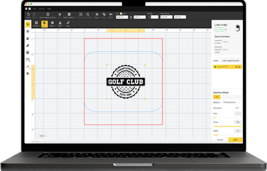
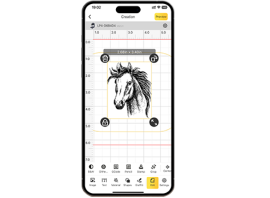
- LaserPecker Design Space for your patterns
- Thread, glue, or snaps for assembly
Step-by-Step Guide
Step 1: Get your book cover design ready on your computer. Think about the size and all the cool details you want.
Step 2: Grab your leather and put it on the laser cutter. Make sure it's stuck down well, so it doesn't move around.
Step 3: Adjust the laser settings just right for your leather. You don't want to burn it!
Step 4: Time to cut out all the leather bits for your cover.
Step 5: If you want, engrave some designs, initials, or a logo onto the leather to make it your own.
Step 6: put some leather oil on it to keep it looking good for ages.
Step 7: Apply leather oil or conditioner to protect and maintain the leather's appearance.
Making Leather Book Covers with the LP5
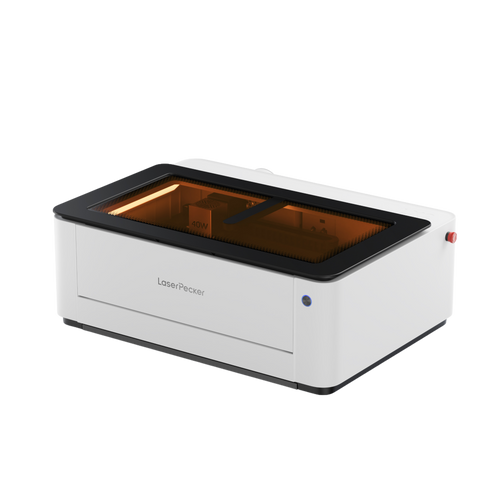
A dual-laser system can significantly expand leather book cover customisation capabilities. For example, a machine like the LaserPecker LP5 combines a blue diode laser and a fibre laser, enabling both cutting and high-detail engraving.

Source: LaserPecker LP5 FaceBook Group
Key Capabilities of LaserPecker LP5
Engraving: Crisp text, logos, and detailed artwork on leather
Cutting: Clean cuts for thin to medium leather thicknesses
Speed and Precision: High engraving speeds maintain sharp detail
Extended Functionality: Optional extensions support batch work and curved items
User-Friendly Operation: Compatible with professional and beginner-friendly software
For leather book covers, a dual-laser system supports both functional cutting and decorative enhancement, making it suitable for hobbyists, designers, and small-scale production.
Part 3: Creative Ideas for DIY Leather Book Covers
Once you've mastered the basics of making a leather book cover, it's time to get creative. This stage isn't just about aesthetics — it's about adding personality and meaning. Whether you're crafting a thoughtful gift or upgrading a notebook you use every day, small design choices can make your cover truly one of a kind.
Initials or Names:
Make your cover special by adding initials. This is a nice personal touch, especially if it's a gift.
Two-Tone Leather:
Use two kinds of leather for a cool look. Try dark brown with light brown for something modern.
Embossed Designs:
Put designs on your cover to make it stand out. Simple patterns look great.
Fancy Stitching:
Use colourful thread to stitch patterns. It turns a plain cover into a work of art.
Leather and Fabric:
Mix leather with denim or cotton. It gives you a unique style and feel.
Part 4: Tips for Making the Best Leather Book Cover
Even with the right tools, the finishing details are what truly define a quality leather book cover. Accurate measuring, choosing the right leather, and proper finishing techniques all play a big role in how your cover looks, feels, and lasts. These practical tips will help you achieve a clean, professional result.
Measure Twice, Cut Once:
Carefully measure the book's height, width, and spine thickness. Always allow extra space for folds and stitching. Accurate measurements reduce waste and ensure a snug, well-fitted cover.
Choosing Leather:
Vegetable-tanned leather is ideal for carving or embossing, while softer leathers are easier to fold and handle. Higher-quality leather not only looks better but also ages more beautifully.
Test it Out:
Before committing to your final piece, test cuts, stitches, or engraving on spare leather. This helps you fine-tune your tools and avoid costly mistakes.
Make Edges Look Great:
Use an edge beveler, burnishing tool, and wax to smooth and seal the edges. Well-finished edges improve durability and give the cover a polished, premium feel.
Taking Care:
Apply a leather conditioner or oil once the cover is complete. This enhances colour, adds a subtle sheen, and keeps the leather supple over time.
FAQs: Questions about Making a Leather Book Cover
Q1. What leather works best for book covers?
Veg-tan leather is usually the best option. It's tough and keeps its shape nicely. Plus, you can stamp it, engrave it, or dye it to jazz it up. If you want something softer that bends easily, go with chrome-tanned or oil-tanned leather. If you're just starting, thinner leather is easier to cut and sew. But, thicker leather gives a more fancy feel.
Q2. Do I need professional tools to make a leather book cover?
Not necessarily. You can start with basic tools like a sharp knife, ruler, and strong thread. However, leather-specific tools—such as hole punches, stitching chisels, and edge finishers—make the process easier and give cleaner, more polished results.
Q3. How do you take care of a leather book cover?
Clean it occasionally with a soft or slightly damp cloth, then apply a light leather conditioner or oil. Avoid soaking it in water or leaving it in direct sunlight for long periods. Proper care keeps the leather from drying out or cracking.
Q4. Can leather book covers be personalised for gifts or selling?
Yes, and that's one of their biggest appeals. You can add initials, quotes, logos, or decorative stitching. Handmade leather covers feel thoughtful and unique, making them ideal for gifts or small handmade product lines.
Q5. Is laser engraving safe for making a leather book cover at home?
Yes, laser engraving can be safe for making a leather book cover at home when proper safety measures are followed. Using correct power and speed settings helps prevent burning, excessive charring, or damage to the leather surface. Because leather types and finishes can vary, it is always recommended to test the engraving on a small or spare piece before working on the final cover.
Safety Notes:
For users in the UK, safety should always come first when laser engraving on leather or other delicate materials.
- LP2 Plus, LP2, and LP4 users: We recommend pairing your machine with the LaserPecker Standard Enclosure when operating in home or workshop settings across the eruope. This accessory enhances protection, complementing the machines' Class 4 Laser Safety compliance under guidelines.
- LP5 users: The LP5 Safety Enclosure is required for proper protection during operation. It ensures adherence to UK safety regulations, safeguarding against accidental exposure in residential or small business environments.
- LX2 users: No additional enclosure is needed. The LX2 is a Class 1 laser system, meaning it is safe to use without extra protective equipment under normal operating conditions.
Beyond laser safety, air quality is a key consideration for indoor workshops. Laser processing generates fumes and fine particles that may impact respiratory health. To meet indoor air quality guidelines and maintain a clean, safe workspace, we strongly recommend using the LaserPecker Desktop Air Purifier , particularly for enclosed or well-insulated homes and studios.
Conclusion
Looking to add a personal touch to your books? Making a leather book cover is a practical and rewarding project. Whether you prefer cutting and stitching by hand or using tools like a Cricut or a laser cutter, each method allows you to create something that truly reflects your style. With the right materials and a bit of patience, you can turn an ordinary book into a durable keepsake that ages beautifully over time.